Components
Every component in snapcn, ready to install.


























































































Screens & Devices
Capture Reveal
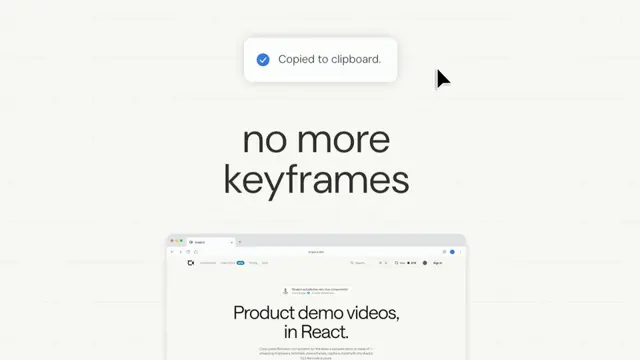
A toast counts a screenshot up to 100% over a browser window, the window drops away, "Copied to clipboard." pops and a headline rises out from behind it
- Type
- Animation
- Duration
- 4.3s
- Category
- Screens & Devices
- Source
- snapcn
Install
$ npx shadcn@latest add @snapcn/capture-reveal
A screenshot being taken. A toast counts Capturing selection… up to 100% over
your product's window; the window drops away and shrinks, the toast pops to
Copied to clipboard., and a two-line headline rises out from behind the window
while the cursor glides up to the toast.
How it moves
The window is one transform. A 108px drop and a 16% shrink ride the same
curve, cubic-bezier(0.549, 0.228, 0.136, 0.938) over 0.8s, about a fixed
origin — then a slow exponential shrink takes over the frame the drop lands, so
the window never quite stops.
The toast presses and releases. While the counter runs it sits pressed in to
88%; on the swap it pops from 0.9 to full size on
cubic-bezier(0.301, 1.056, 0.803, 1). The counter is linear: three percent a
frame.
The headline rises from behind the window. It does not scale and does not blur — it climbs 23px on a long ease-out and fades in on a faster curve of its own, so it is readable before it has finished arriving.
Notes
Every curve was measured off a 24fps screen recording, frame by frame, and verified by rendering this component at the recording's own size and timestamps and diffing the two in Y′CbCr. The window, toast and cursor land within a tenth of a pixel on every frame. The recording starts mid-count, so the first 1.3s — the toast arriving and pressing in — is built from the same curves.
The type is DM Sans with its optical-size axis pinned per element — the display cut for the headline, the text cut for the toast — so a 1080p render draws the same letterforms as a 720p one. It loads from fontsource; if it cannot, Google's DM Sans paints.
src is laid in at the window's full width, top first. A screenshot at least
3:4 tall keeps the window's bottom edge out of frame the whole time.
Installation
$ pnpm dlx shadcn@latest add @snapcn/capture-revealNeeds an existing Remotion project and a components.json. Two-minute setup if this is your first snapcn component.
Component code
The exact file shadcn add copies into your project.
Usage
// src/Root.tsx
import { Composition, staticFile } from "remotion";
import { CaptureReveal } from "@/components/snap-cn/capture-reveal";

const Hook = () => (
  <CaptureReveal
    src={staticFile("my-app.png")}
    headline="no more | screenshots"
  />
);

export const RemotionRoot = () => (
  <Composition
    id="CaptureReveal"
    component={Hook}
    durationInFrames={130}
    fps={30}
    width={1280}
    height={720}
  />
);
Props
| Prop | Type | Default | Description |
|---|---|---|---|
src | string | "https://media.snapcn.dev/stills/capture-reveal-window.webp" | The screenshot in the window — a browser or app window works best. Laid in at full width, top first |
headline | string | "no more | keyframes" | The headline that rises from behind the window; | breaks a line |
capturing | string | "Capturing selection..." | The toast while the counter runs. The box sizes itself to it |
copied | string | "Copied to clipboard." | The toast once it lands |
fontFamily | string | "Default" | DM Sans unless you name one of the loaded faces |
theme | Partial<SnapCnTheme> | — | Design-system token overrides. Anything you leave out falls back to the shadcn defaults |
mode | "light" | "dark" | — | Which end of the design system to resolve tokens against |
Frequently asked questions
How do I add Capture Reveal to a Remotion project?
Run npx shadcn@latest add @snapcn/capture-reveal. The source is copied into components/snap-cn/ (or wherever your components.json points) with anything it depends on, and you own the code from then on — there is no runtime package to keep installed.
What is Capture Reveal?
Capture Reveal is a Remotion screenshot capture animation for React. A toast counts a screenshot up to 100% over a browser window, the window drops away, "Copied to clipboard." pops and a headline rises out from behind it.
What do I need before using Capture Reveal?
An existing Remotion project (npx create-video@latest) with a components.json. shadcn init does not recognise Remotion, so the installation guide has you write that file by hand — it takes two minutes. The component is MIT licensed and free.