


































































































Text & Titles
Word Wheel
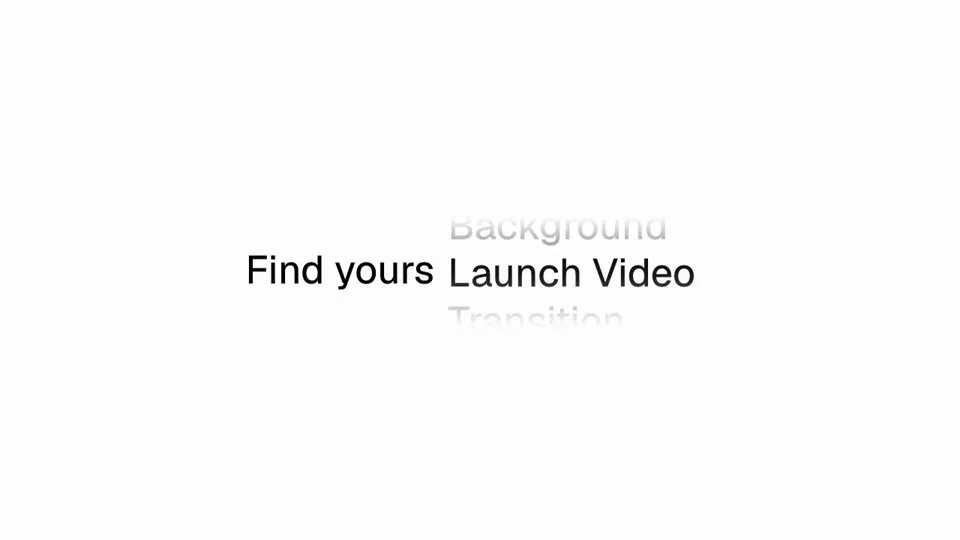
A column of words that spins like a reel and stops on one of them — the lead-in holds the left of the line while the answer rolls into the slot beside it, decelerating over a second and three quarters
- Type
- Animation
- Duration
- 2.2s
- Category
- Text & Titles
- Source
- snapcn
Install
A sentence with a hole in it, and a reel that fills the hole. snapcn for holds
the left of the line; the word that finishes it lives in a slot to its right,
one row of a taller column whose other words are visible above and below,
smaller and grey, fading out toward the top and bottom of the frame.
The reel rolls, decelerates, and comes to rest with one word at full size and in ink. Left at the list's own length it turns exactly once — the scene shows its answer, spins it away, and brings it back.
How it moves
The deceleration is a measurement, not a curve. It ships as a fifty-one point table taken off a recording, because nothing standard fits: the closest cubic-bezier is five pixels out at its worst and the closest spring 4.3px RMS. A fifth of a row is a visibly different frame, so the measurement ships instead.
The selected word lags the slot. A row takes the slot when it is nearest to it, but it does not arrive at full size on the frame it crosses — it grows into it over about seventy milliseconds. That lag is why the fast part of the roll never looks like a row of identical pops: each word is still growing when the next one takes over.
The scale pivots on the baseline. Every row's baseline sits on a 34px grid, the oversized one included, which is the only pivot a browser will not round: it quantises a glyph's origin to a whole device pixel vertically, so a scale that moves the baseline makes the word climb the grid in jumps.
Notes
The reel is left-aligned twice over. The selected word steps left out of the column to finish the sentence and steps back when it loses the slot — that is measured off the reference and it is what makes the line read as a line rather than as a list with one row shouting.
The gap between the lead-in and the word is a gap, not a position. Pin the word to an x and a shorter lead-in leaves a hole while a longer one runs the two together.
Installation
$ pnpm dlx shadcn@latest add @snapcn/word-wheelNeeds an existing Remotion project and a components.json. Two-minute setup if this is your first snapcn component.
Component code
The exact file shadcn add copies into your project.
Usage
// src/Root.tsx
import { Composition } from "remotion";
import { WordWheel } from "@/components/snap-cn/word-wheel";

const Hook = () => (
  <WordWheel
    headline="snapcn for"
    words="Launches, Founders, Indie hackers, Agencies, Designers, Startups, Dev tools, Solo builders, Changelogs"
  />
);

export const RemotionRoot = () => (
  <Composition
    id="WordWheel"
    component={Hook}
    durationInFrames={66}
    fps={30}
    width={1280}
    height={720}
  />
);
Props
| Prop | Type | Default | Description |
|---|---|---|---|
headline | string | "snapcn for" | The part of the line that never changes |
words | string | — | The reel, comma separated. It cycles, so the column is never empty — and its FIRST entry is the word the scene comes to rest on |
spin | number | 9 | Rows travelled. Left at the list's own length the reel turns exactly once and comes home |
fontFamily | string | "Default" | Jost unless you name one of the loaded faces |
theme | Partial<SnapCnTheme> | — | Design-system token overrides. Anything you leave out falls back to the shadcn defaults |
mode | "light" | "dark" | — | Which end of the design system to resolve tokens against |
Frequently asked questions
How do I add Word Wheel to a Remotion project?
Run npx shadcn@latest add @snapcn/word-wheel. The source is copied into components/snap-cn/ (or wherever your components.json points) with anything it depends on, and you own the code from then on — there is no runtime package to keep installed.
What is Word Wheel?
Word Wheel is a Remotion rotating words animation for React. A column of words that spins like a reel and stops on one of them — the lead-in holds the left of the line while the answer rolls into the slot beside it, decelerating over a second and three quarters.
What do I need before using Word Wheel?
An existing Remotion project (npx create-video@latest) with a components.json. shadcn init does not recognise Remotion, so the installation guide has you write that file by hand — it takes two minutes. The component is MIT licensed and free.